Skip to content

Portfolio · Independent restaurants · Web

Open it at closing.The day is already counted.

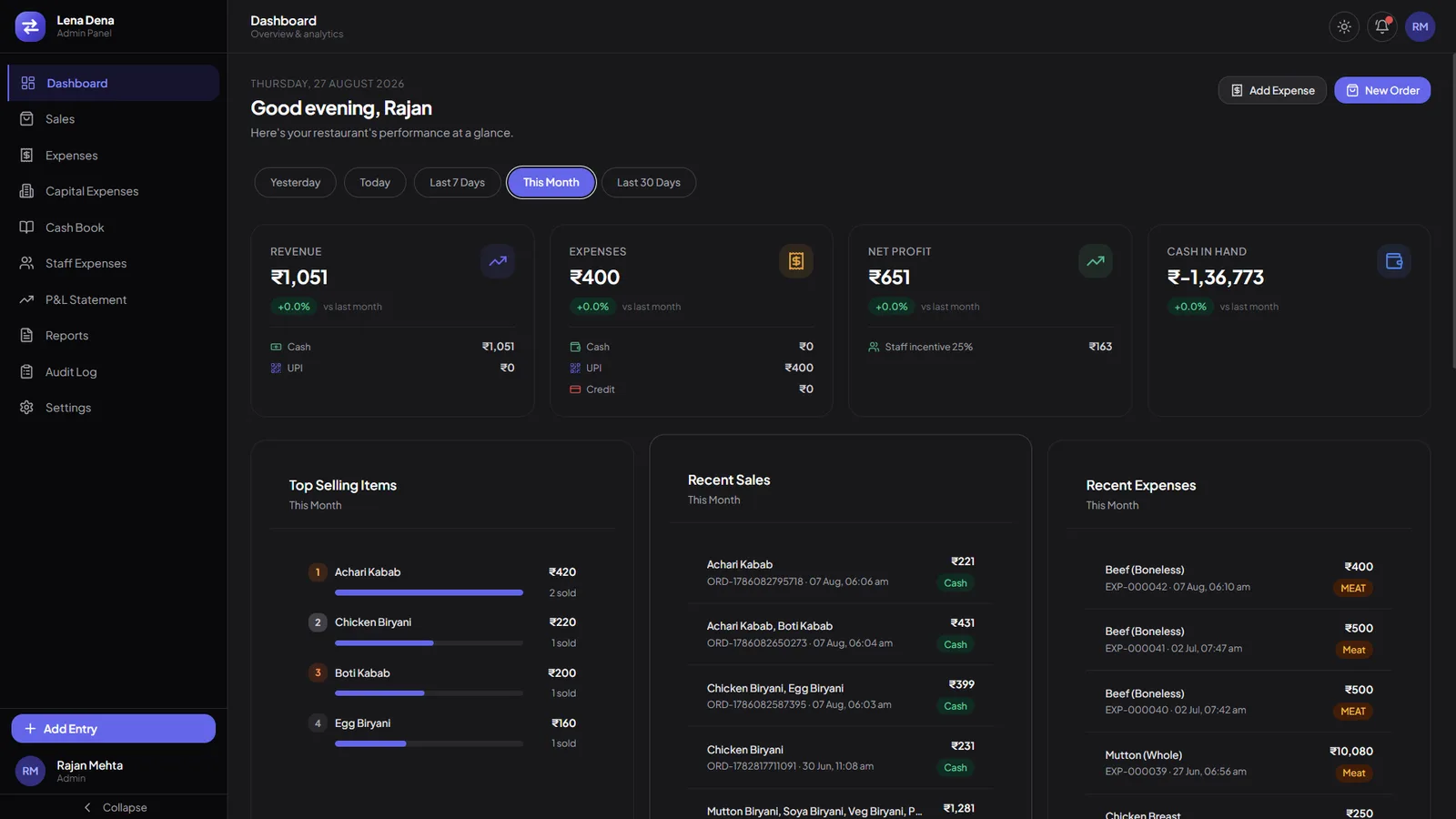
This is the admin panel behind an independent restaurant’s books: the day’s takings split cash against UPI on the card rather than in a report somebody has to run, every cost filed under a category and a payment state, a receipt that is configured rather than hard-coded, and a trail carrying who entered what. The panel is one half of the system — its settings also govern the companion app the cashiers enter from.

A restaurant books dashboard opening on revenue, expenses, net profit and cash in hand, each card splitting cash against UPI, with top selling items and recent entries beneath.
Open it at closing: four cards, each already split cash against UPI.
01Sector
Independent restaurants
02Surfaces
Admin panel, governing a companion cashier app
03Roles
Three — Admin, Staff and Cashier
04Data
A test instance throughout, not a trading kitchen
Act 01/ 032 captures

The day’s takings

Cash against UPI, on the card.

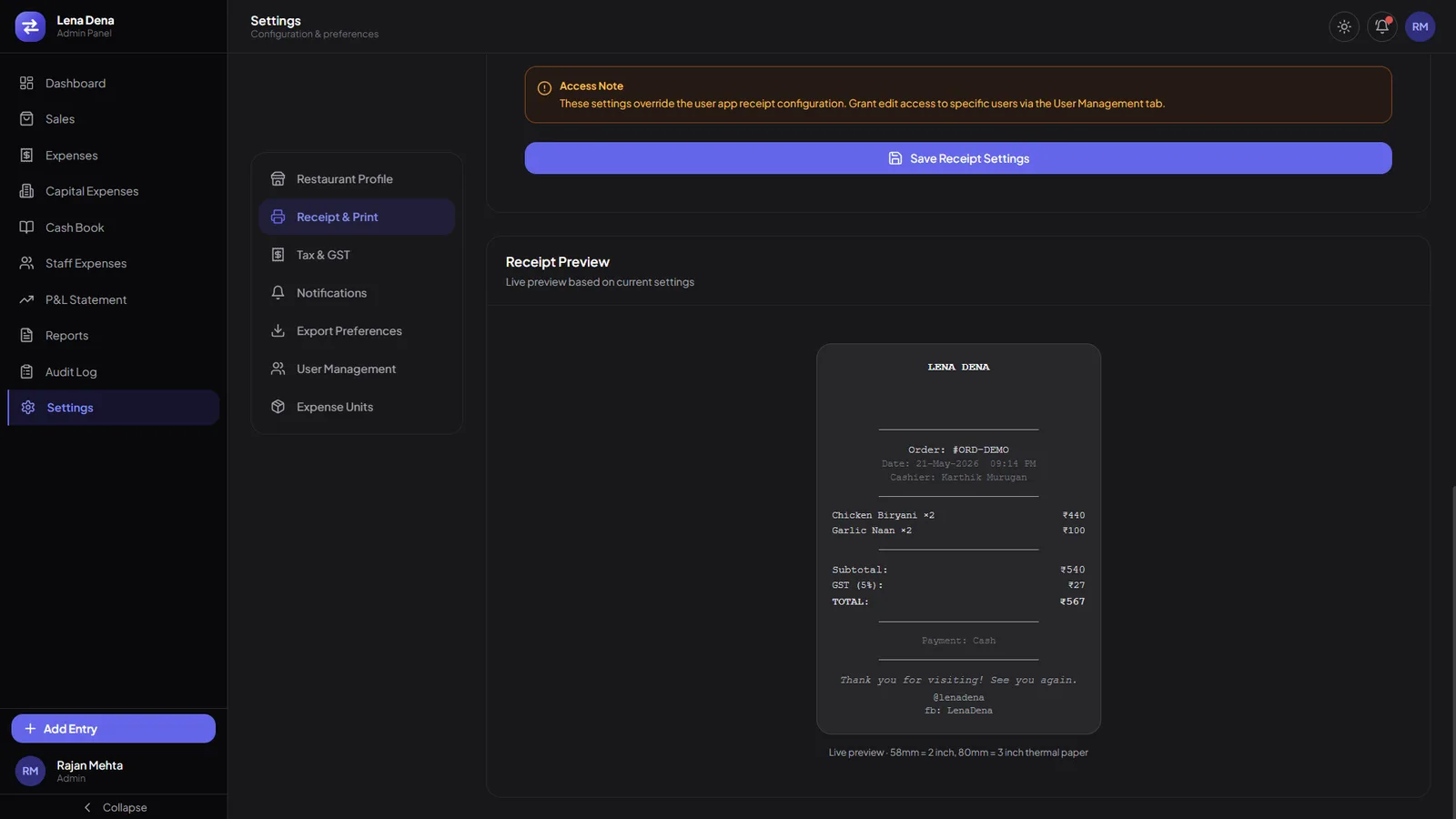
Every figure separates the two payment modes where it is shown, not in a later report. Behind the evening read sits the order book: each order under the token the counter called and the order ID it was written against, so both point at the same line, with status and mode narrowed inside the table and six date presets and a custom range over the top. Four actions ride every row — view, edit, cancel and print — and the thing that prints is configured rather than hard-coded: header, tax, footer and paper width live in Settings, and override the companion app.
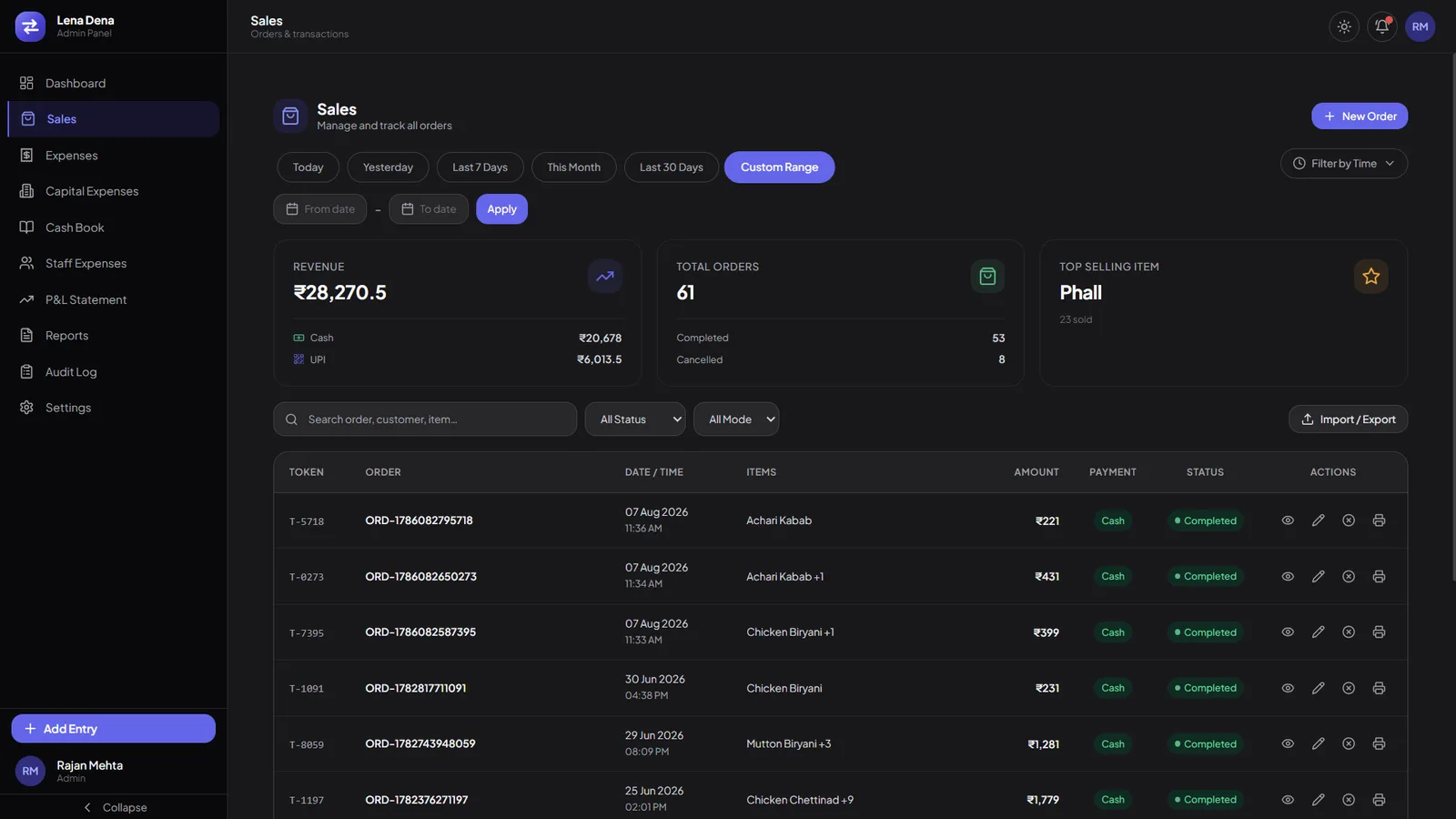
A sales table listing orders by token and order ID with date, items, amount, payment mode and status, above revenue, total orders and top selling item cards.
Token beside order ID, so the counter’s call and the record point at one order.
A receipt and print settings tab with a live thermal receipt preview beside it, showing the header, order lines, GST and footer.
The preview redraws from live settings, at 58 mm or 80 mm.
  1. 01.01

    Cash against UPI, on every card

    The split sits on the figure itself rather than in a report somebody has to go and run.

  2. 01.02

    Token and order ID together

    What the counter called and what the book recorded, on one row.

  3. 01.03

    The receipt is configured

    Header, tax, footer and paper width live in Settings, and override the companion app.
Act 02/ 032 captures

The cost of serving it

Every cost carries a category and a state.

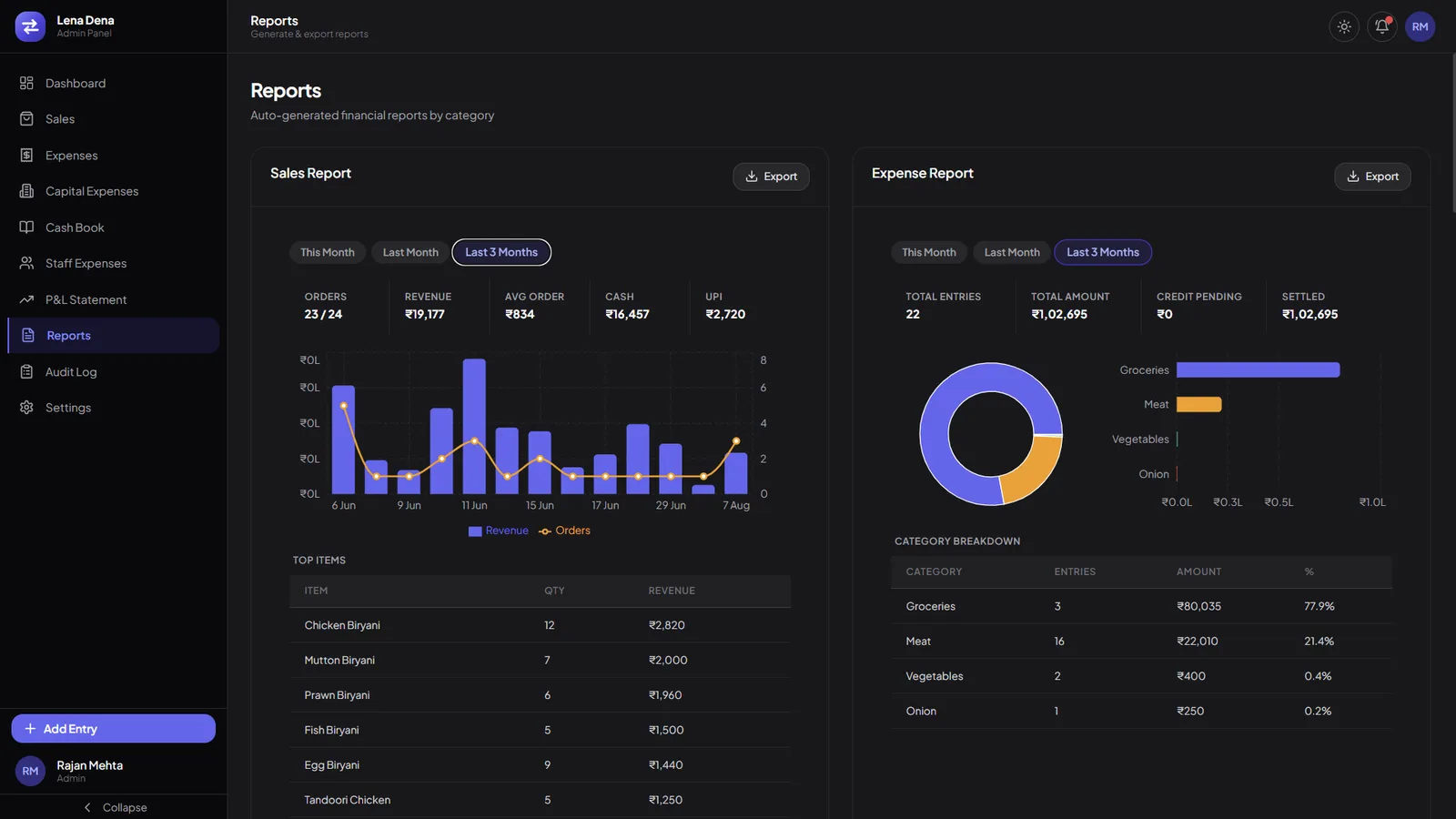
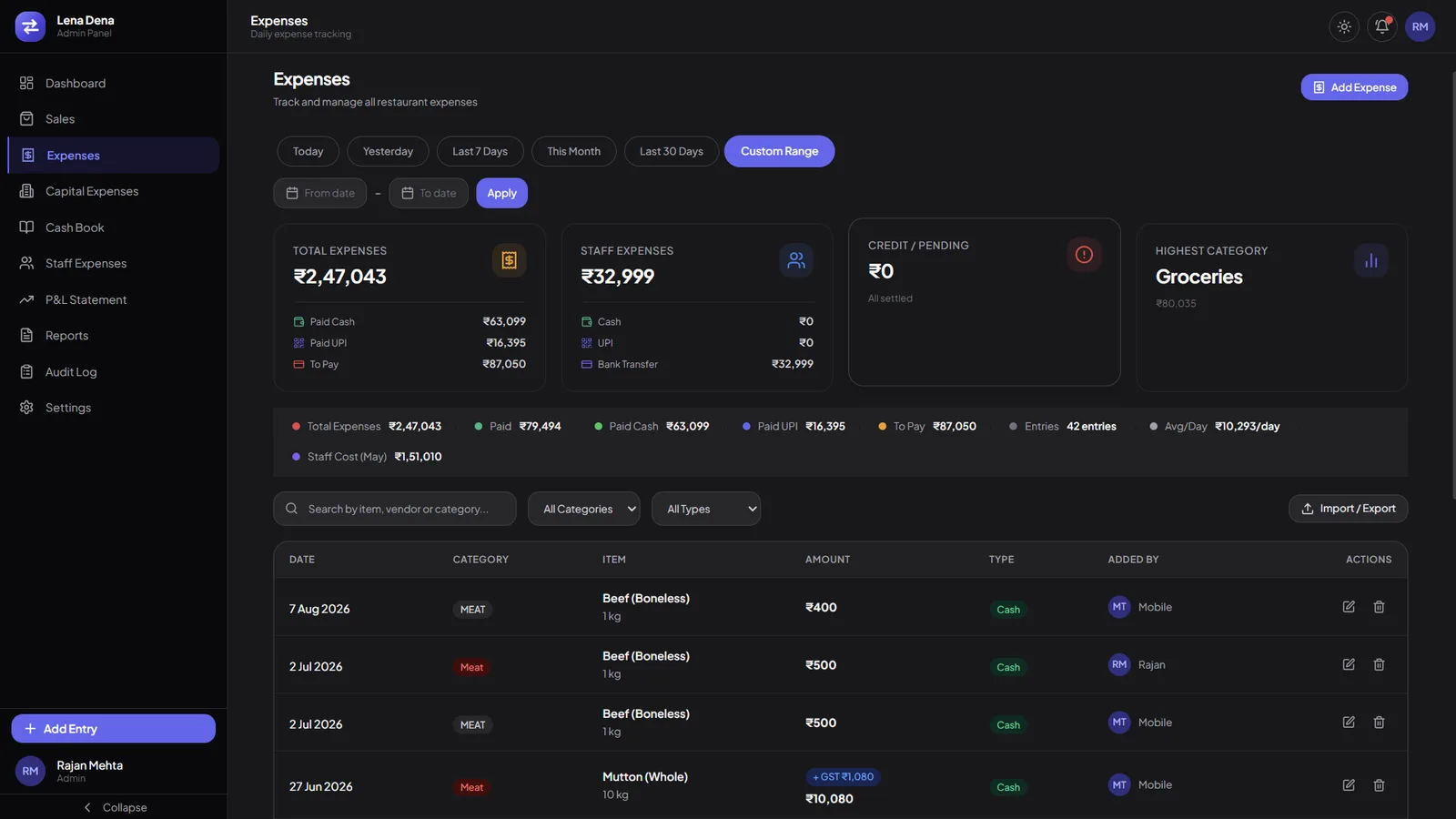
The other half of the book. Paid cash and paid UPI are held apart from what is still owed, staff expenses sit on their own card because they settle by bank transfer rather than out of the till, and each line carries its category, its quantity and unit, and a GST chip where tax applied — with eight running totals on one strip above the table. Both halves then read against each other over the same window: orders, revenue, average order and the split on one side; entries, total, credit pending and settled on the other. Each leaves as a file.

An expenses screen with total expenses, staff expenses, credit pending and highest category cards, a strip of eight running totals, and a table of costs by category, item, amount and type.
Paid cash, paid UPI and still to pay, held apart — with staff costs on their own card.
Two report panels side by side: a sales report with a revenue bar and order line chart above a top items table, and an expense report with a category donut and breakdown.
Both sides of the book, over the same window, each with its own export.
  1. 02.01

    Paid, or still to pay

    Paid cash and paid UPI are counted apart from what is still owed.

  2. 02.02

    Staff expenses stand apart

    On their own card, settled by bank transfer rather than out of the till.

  3. 02.03

    Both sides export

    This month, last month or last three — each report leaves as a file.

Act 03/ 032 captures

Who touched the books

Who did what, and when, on one page.

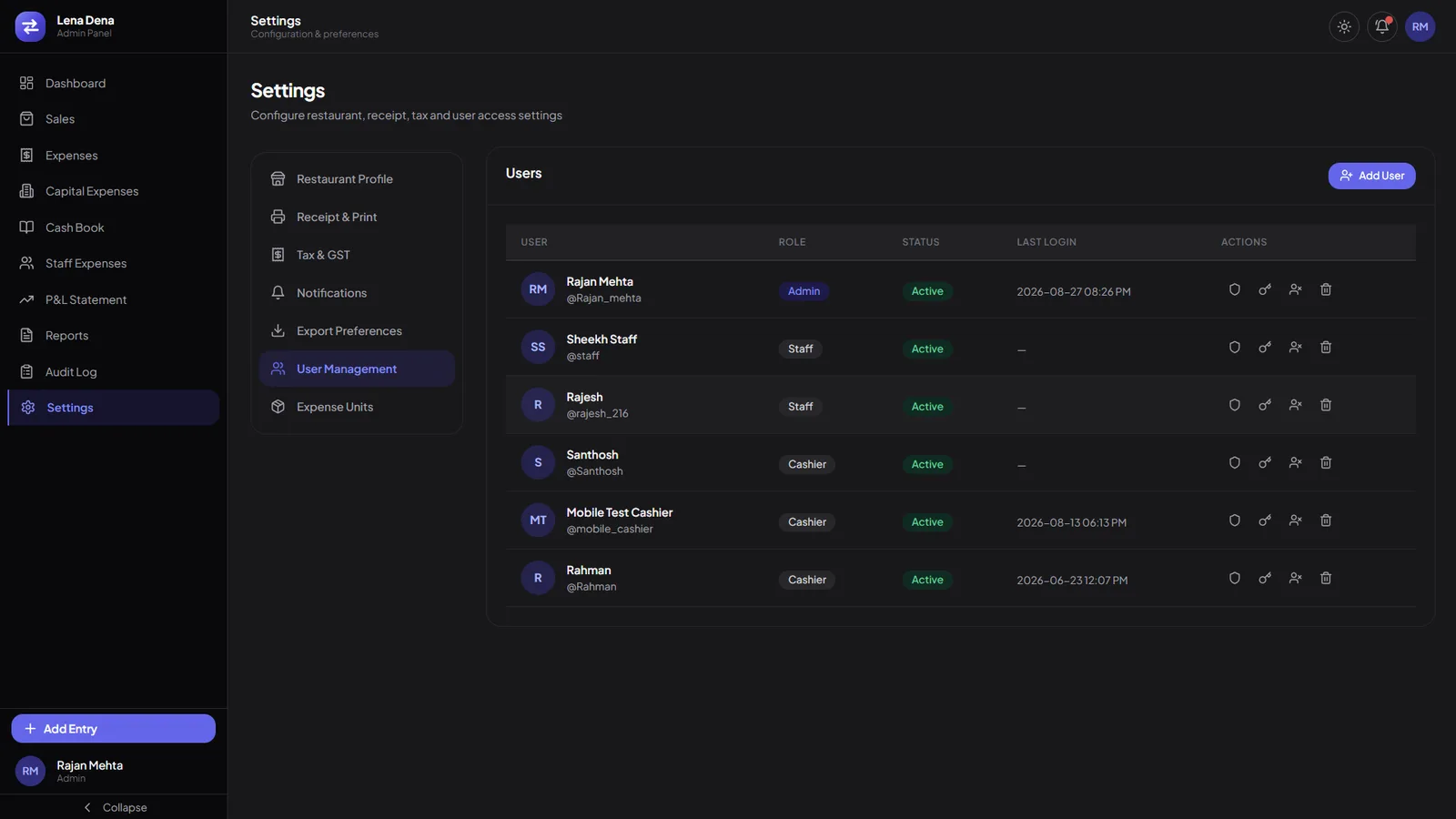
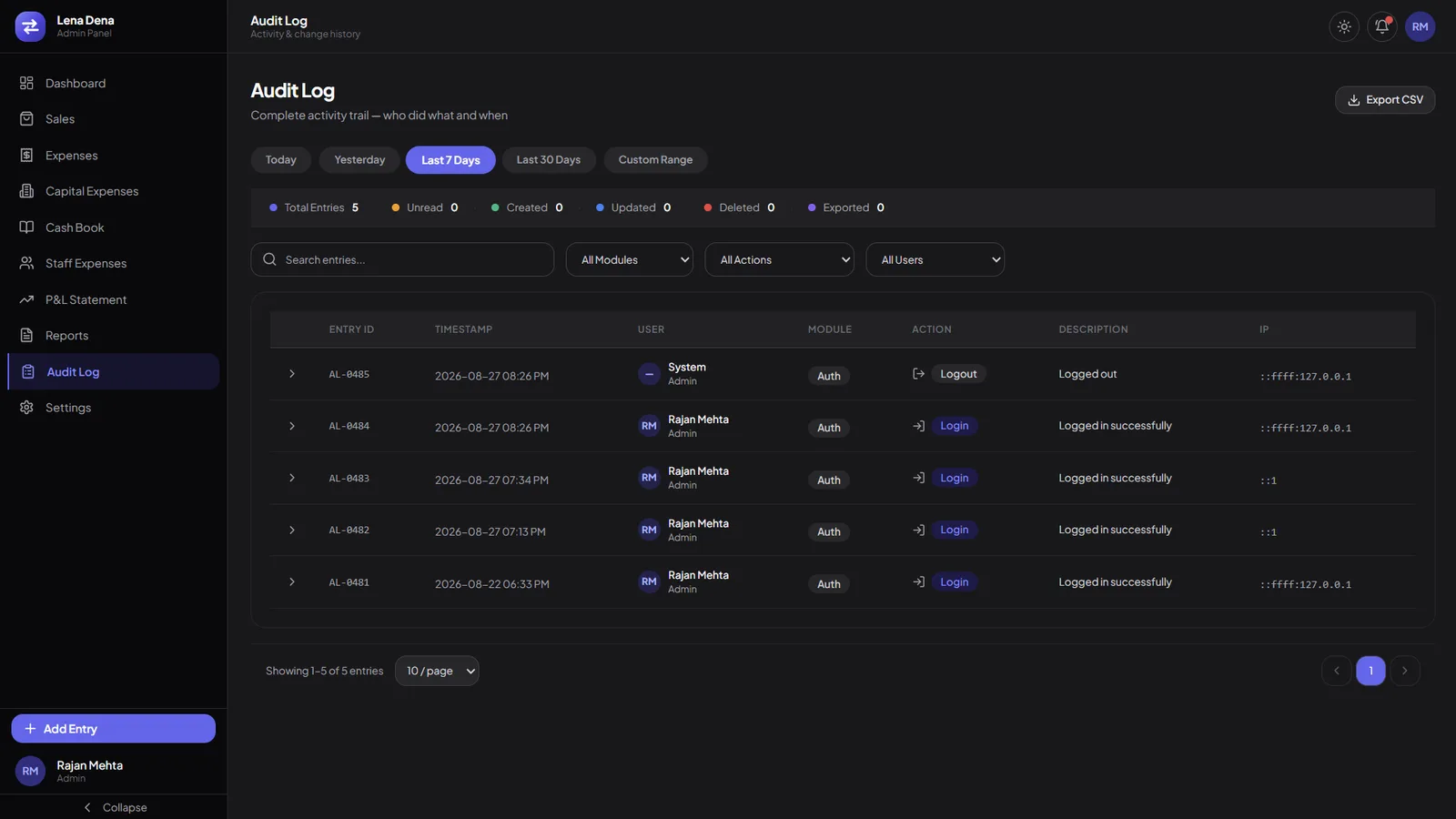
Three roles — Admin, Staff and Cashier — are set on the account and shown as a chip, with four actions on every row: permissions, password, deactivate and delete. An account that has never been signed into carries a dash rather than an invented last login. The trail behind them is sequential and filterable by module, by action and by user: each entry carries its own ID and timestamp, who acted, where in the app, and what they did to it — and the filtered trail leaves as a CSV that the trail then counts.

A user management table listing accounts with a role chip, an active status, a last login column carrying a dash where the account is unused, and four row actions.
A role on the account, and a dash where the account has never been used.
An audit log with six counters across the top, module, action and user filters, and rows carrying entry ID, timestamp, user, module, action and description.
Entry ID and timestamp, then who acted, where in the app, and what they did to it.
  1. 03.01

    Three roles, set on the account

    Admin, Staff and Cashier, shown as a chip and granted one account at a time.

  2. 03.02

    A dash, not a date

    An account that has never been signed into says so, rather than showing an invented last login.

  3. 03.03

    The export is counted too

    Exported sits in the trail’s own totals, beside created, updated and deleted.

The last word

This shows how Famysys builds a back office: start from the book a business already keeps — what came in, what went out, who wrote the line — and put it on one screen a manager can read at closing without being trained on it. The panel shown here is half the system; its settings also govern the companion app the cashiers enter from. If your business closes its day on a book, we start from that book rather than from a template.

Built in

  • Daily takings
  • Expense & staff costs
  • Configured receipts
  • Role-based access
  • Audit trail

All projects

Let's build what's next

Technology alone doesn't transform businesses.The right partnership does.

Modernizing systems, building a new product, or exploring AI-driven transformation — Famysys helps you move forward with confidence.

  • SOC2 Type II Compliant
  • Strict Commercial NDA
  • Zero Lock-In Guarantee

Famysys

We Engineer Clarity

Scan to Connect

Instant digital business card & WhatsApp link