Skip to content

Portfolio · Wholesale trading · Web

Your ledger, written onceand settled in parts.

This is a day-book for a wholesale trader who buys and sells on credit and settles in parts: an accountant records each purchase, sale, payment and box movement, every party’s balance stays current, an A5 bill prints from the same entry, and each role sees only what it may touch.

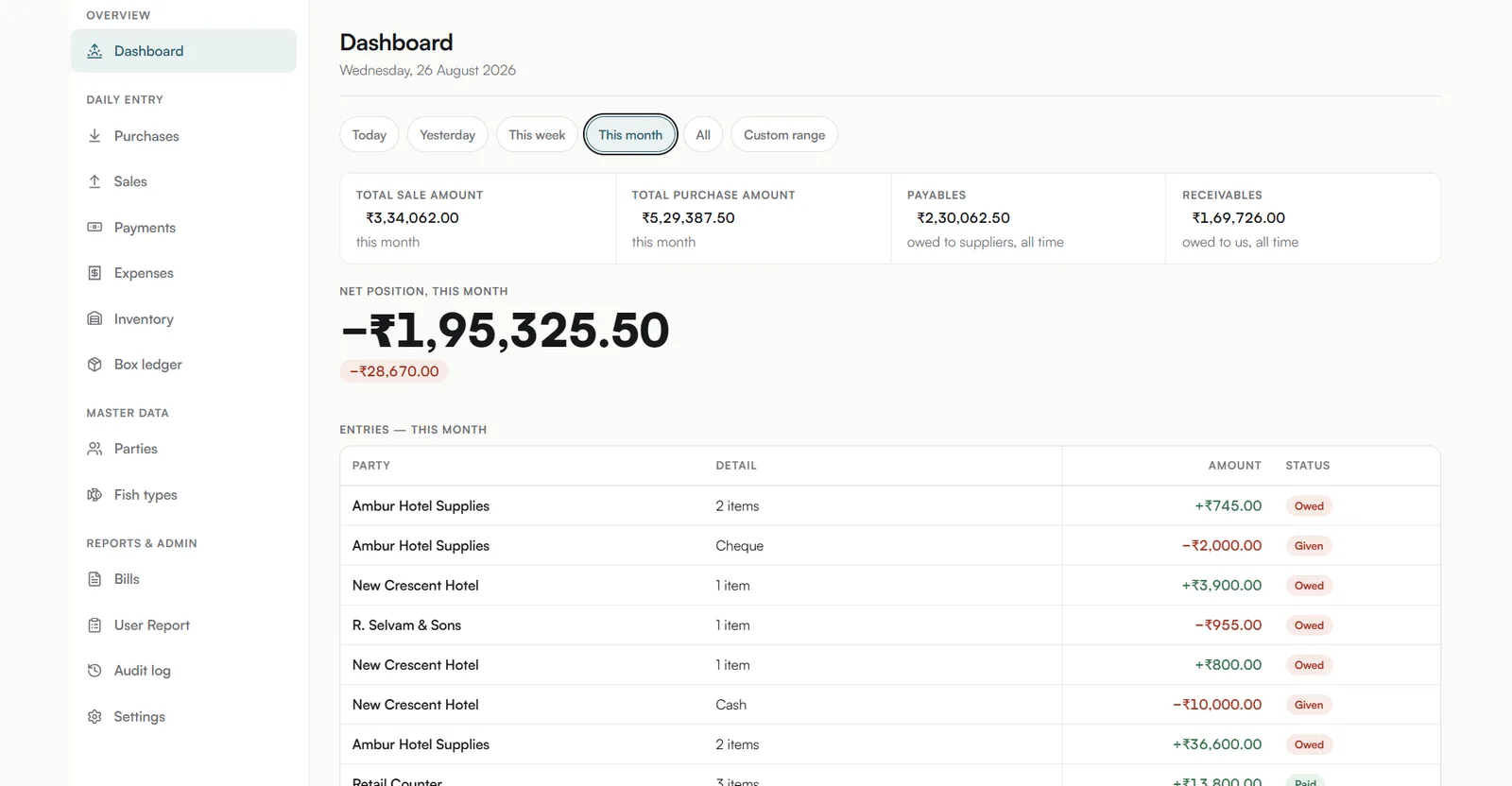
A day-book dashboard opening on total sales, total purchases, payables and receivables, with a net position for the month beneath them.
The day opens on the position: four figures across the top, one net number under them.
01Sector
Wholesale trading — bought and sold on credit
02Surfaces
Web and mobile, one codebase
03Roles
Five, on one permissions grid
04Stack
React Native · Expo
Act 01/ 032 captures

The day-book

The day opens on the position.

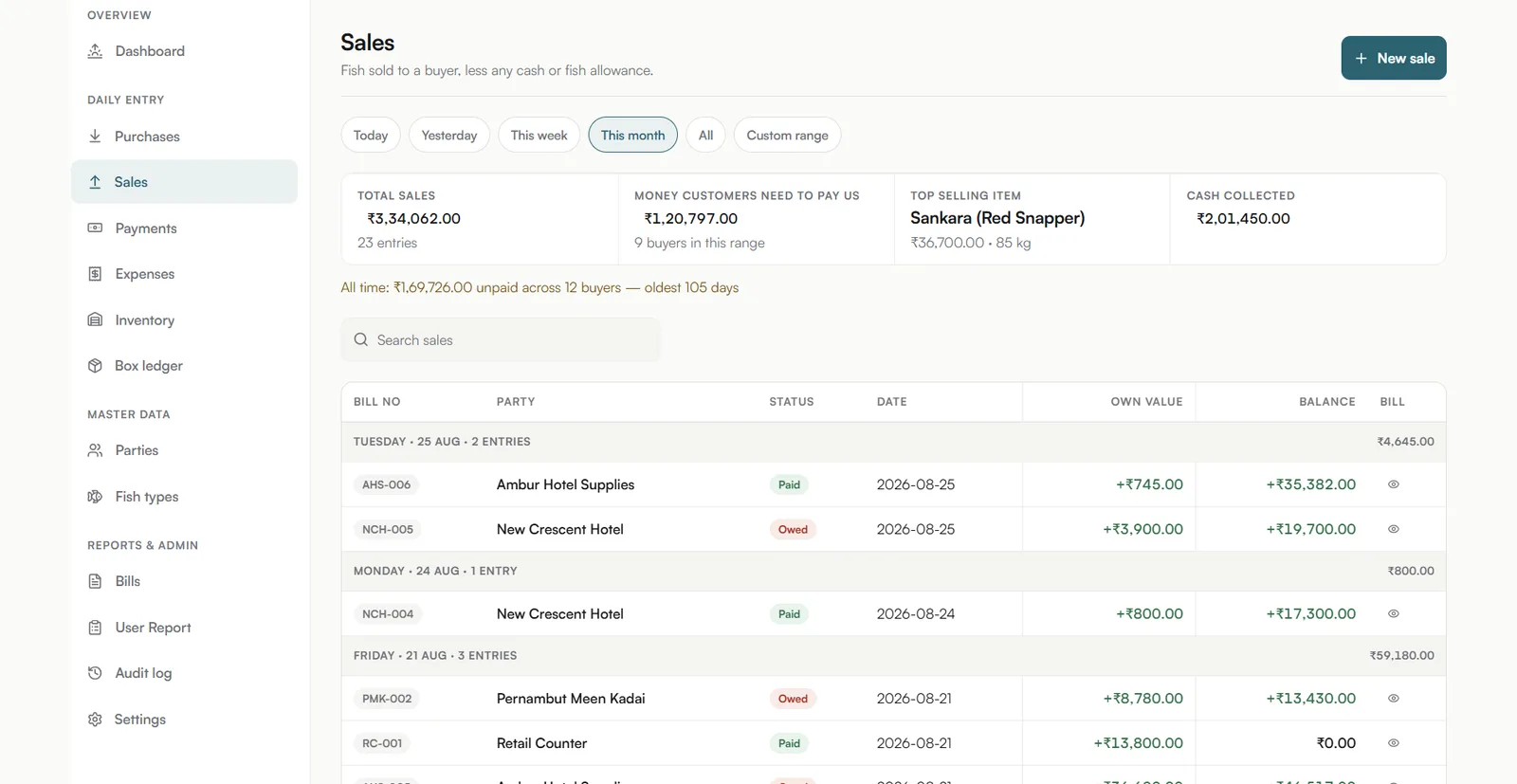
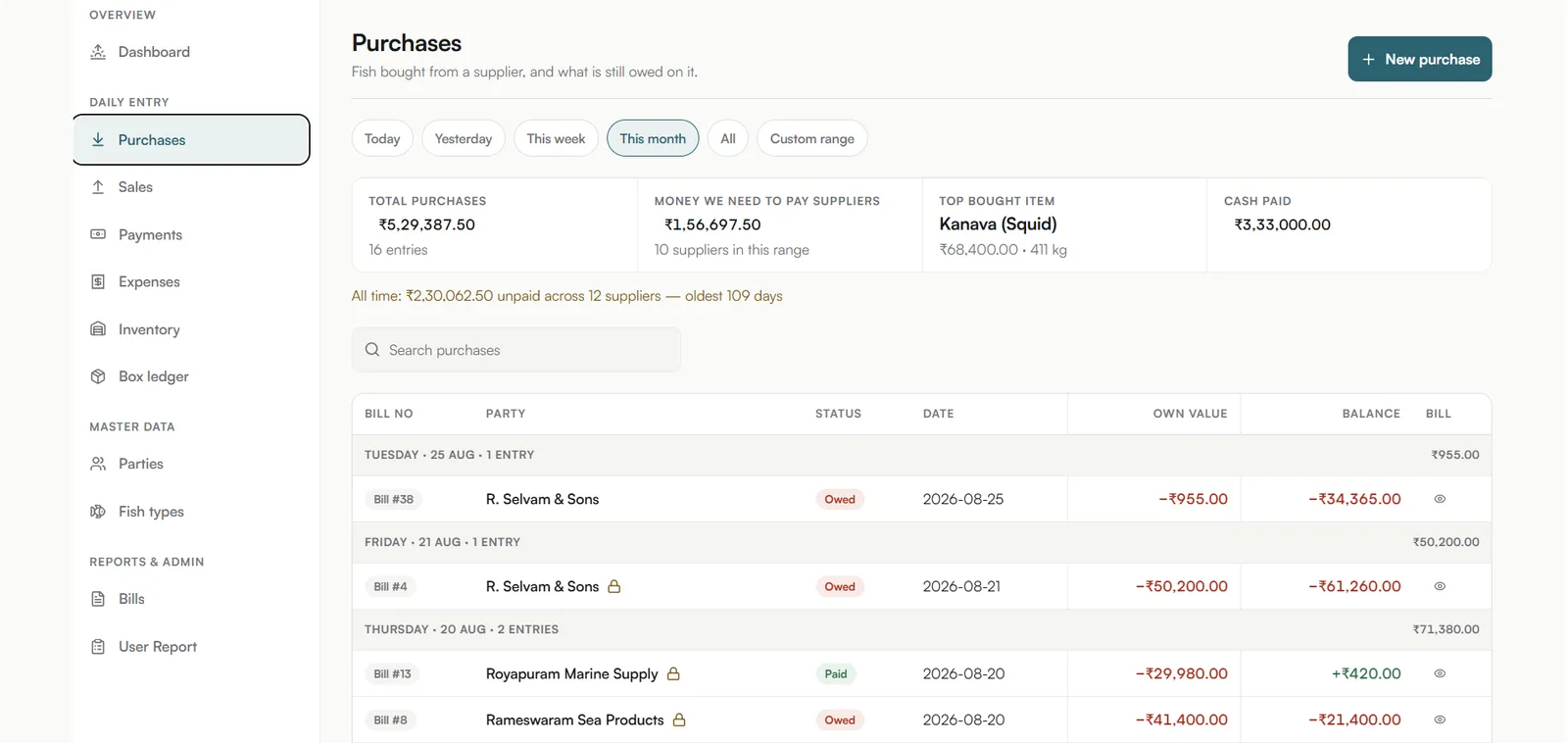
A purchase or a sale is typed once, and the party’s balance, the day’s position, the printed bill and the reports all read from that one entry. Every row after carries its own direction — green for money in, red for money out — with a status of Owed, Given or Paid, and the whole book answers to any range: today, this week, this month, all time or a custom one.
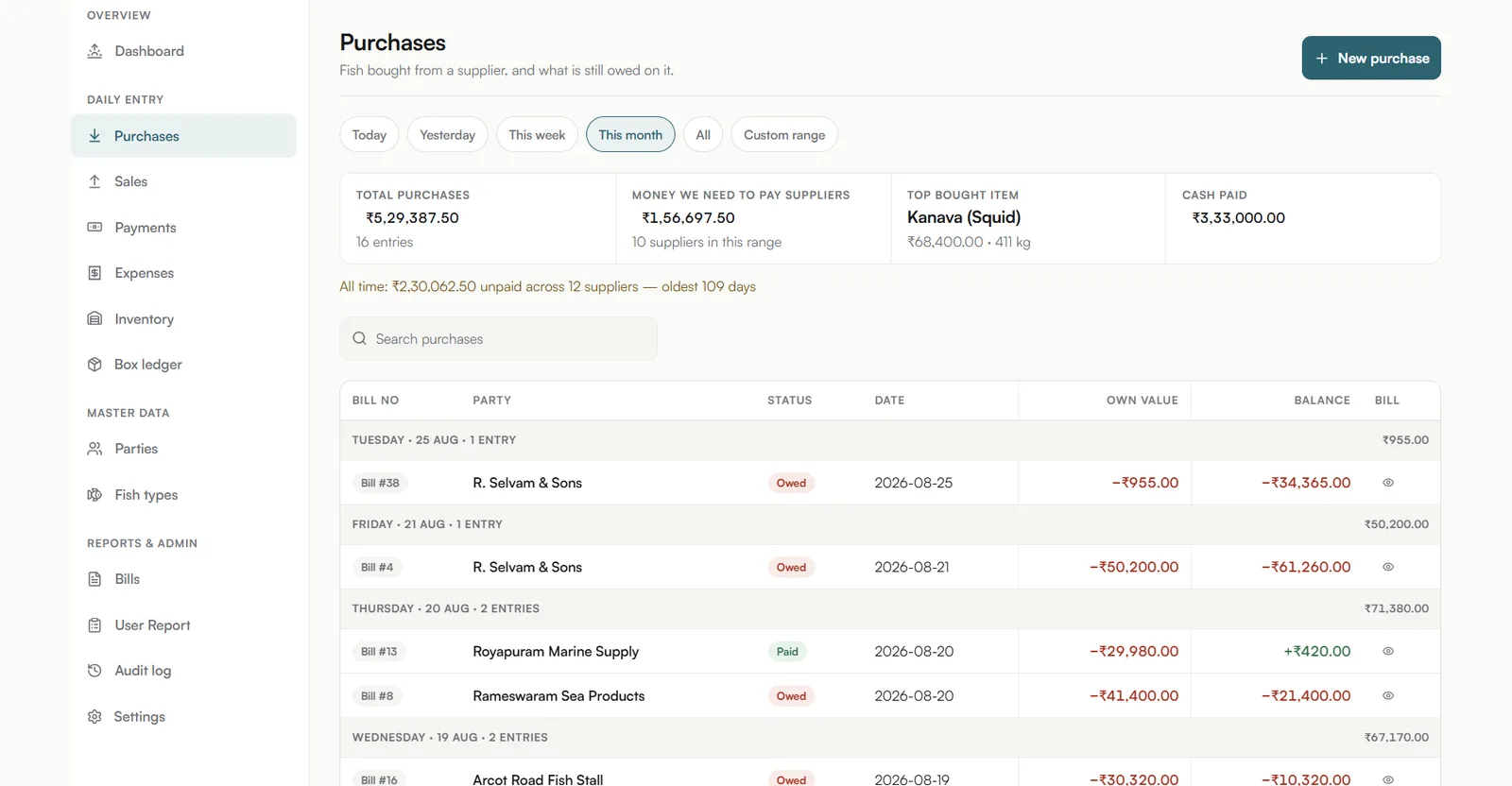
A purchases screen listing fish bought from suppliers, grouped by day, with a running balance beside each bill.
Fish bought from a supplier, and what is still owed on it.
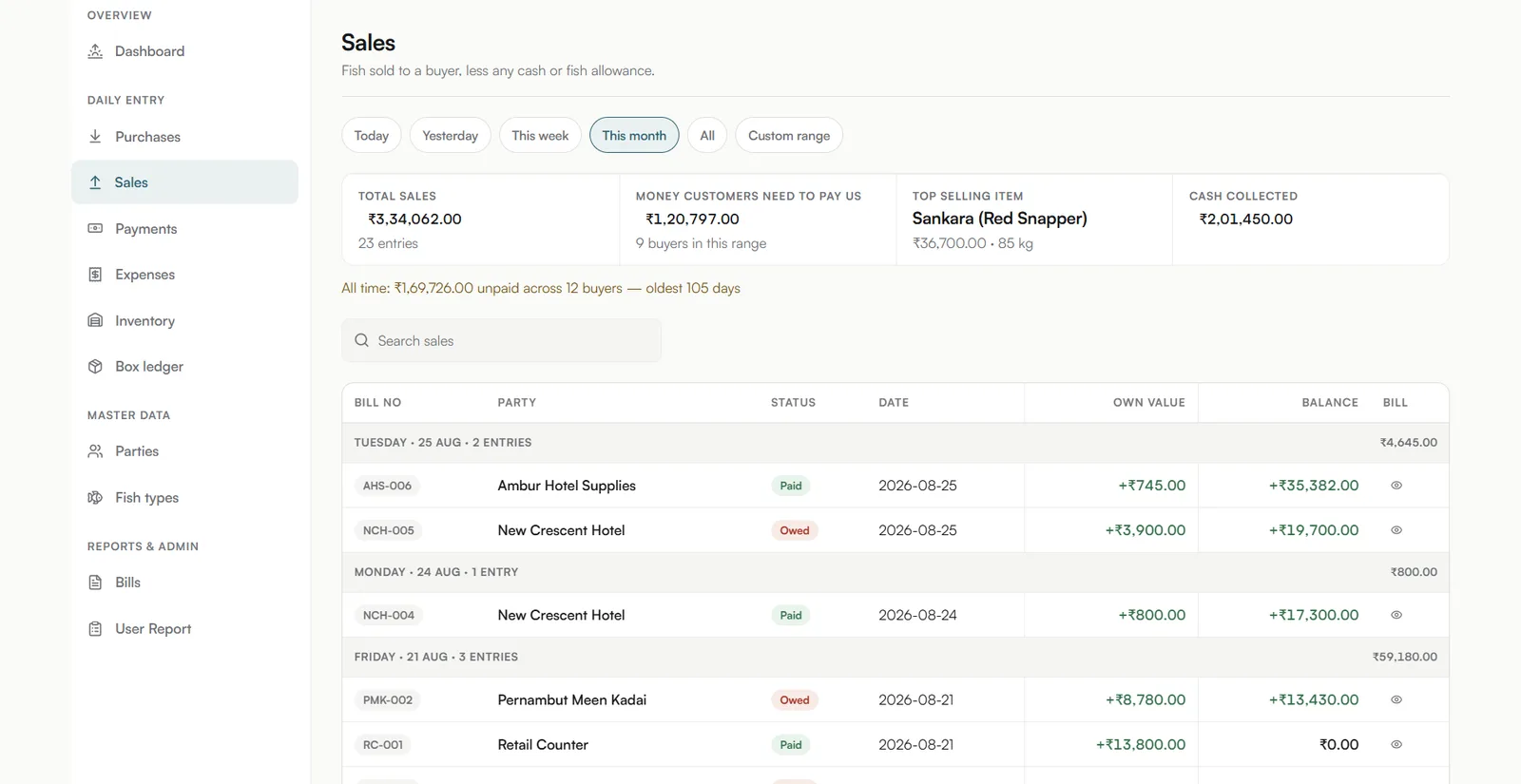
A sales screen mirroring the purchases view, with money flowing in against each buyer.
Fish sold to a buyer, less any cash or fish allowance.
  1. 01.01

    Four figures, one net number

    Sales, purchases, payables and receivables sit across the top; a single net position for the range sits under them.

  2. 01.02

    Every row carries a direction

    Green for money coming in, red for money going out, with a status of Owed, Given or Paid.

  3. 01.03

    Any range, six ways to pick it

    Today, yesterday, this week, this month, all time or a custom range — the whole day-book answers to it.
Act 02/ 03No captures

The bill

The entry, printed as an A5 bill.

Pick an entry and the bill renders beside it, ready to print: supplier, date and bill number; each fish with box, kg, rate and total; then charges and the old balance. Boxes travel with the fish, so a balance box, a box out and a box return sit beside the money — and any charge or total row can be switched off in Settings, so the bill carries only what this business uses.

  1. 02.01

    Header, lines, charges, balance

    Supplier, date and bill number; each fish with box, kg, rate and total; then charges and old balance.

  2. 02.02

    Boxes travel with the fish

    Balance box, box out and box return sit beside the money, because the crates are owed too.

  3. 02.03

    Any row can be switched off

    Each charge and total row is a toggle in Settings, so the bill carries only what this business uses.

Act 03/ 033 captures

Who sees what

Five roles, one grid.

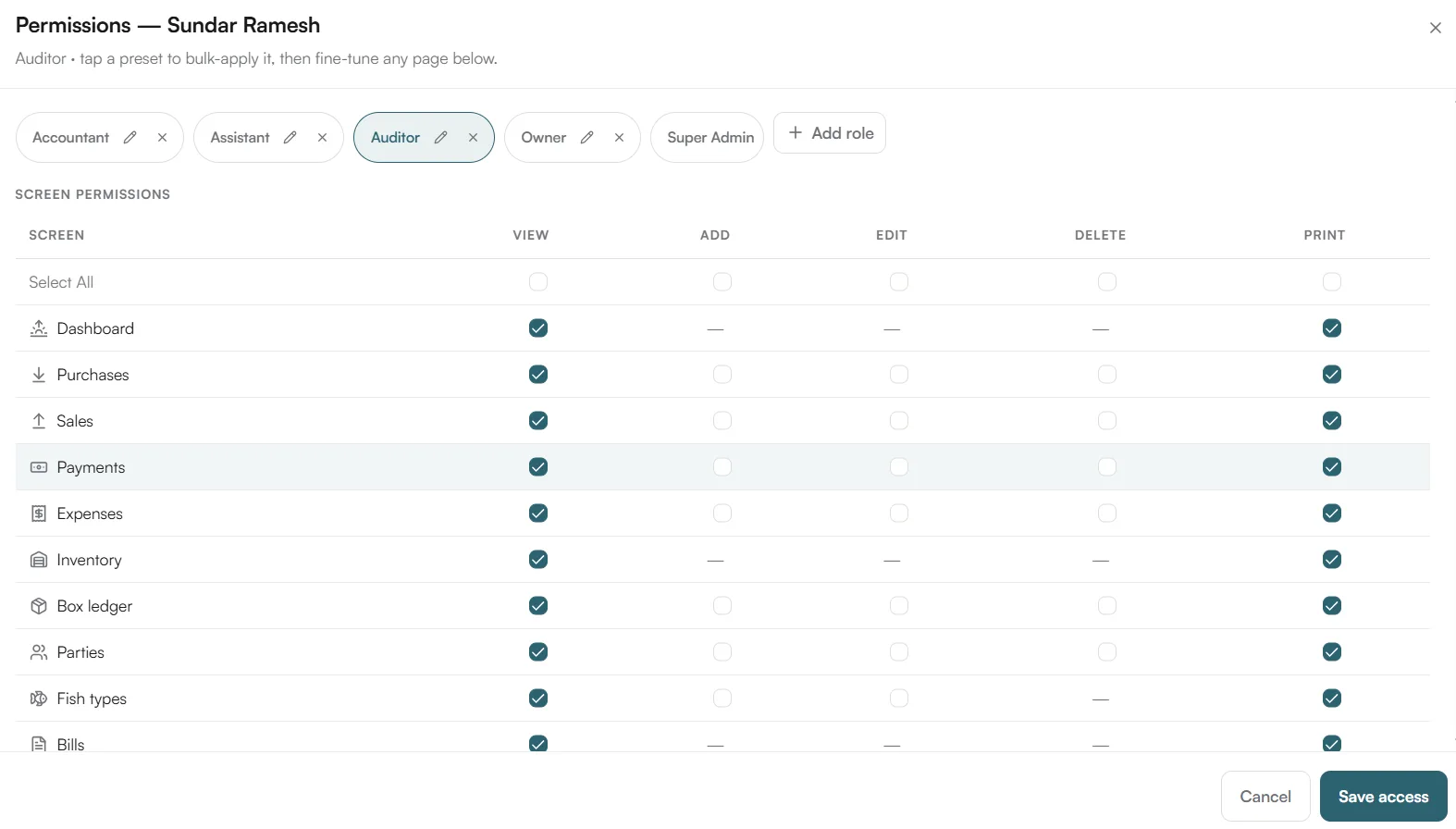
A role is a preset: tap one to apply it, then fine-tune any screen, right by right. Accountant, Assistant, Auditor, Owner and Super Admin each start from a preset, and every screen carries five rights — view, add, edit, delete and print — with a dash where the right does not apply. An accountant can edit or delete an entry for a set number of days; after that the row locks and turns view-only, though owners are never locked out.

A permissions grid with five role presets across the top and a screen-by-screen view, add, edit, delete and print matrix beneath.
Five roles on one permissions grid, with a preset for each and every right still tunable.
A purchases list as the accountant sees it, with older bills carrying a padlock icon beside the party name.
Old entries lock for the accountant — the window is set in days by the Super Admin.
A sales screen as the auditor sees it, with the New sale button and the Settings and Audit log sidebar entries gone.
The auditor reads everything and adds nothing: no New sale button, no Settings or Audit log in the sidebar.
  1. 03.01

    Preset first, then fine-tune

    Accountant, Assistant, Auditor, Owner and Super Admin are presets; any single cell can still be changed.

  2. 03.02

    Five rights on every screen

    View, add, edit, delete and print, each its own checkbox, with a dash where the right does not apply.

  3. 03.03

    Auditor: sees all, changes nothing

    Every view and print right is ticked, every add, edit and delete left clear.

The last word

The day-book shows how Famysys builds for a business that runs on credit and settles in parts: one entry per purchase or sale, balances that move with every payment, an A5 bill rendered from the entry itself, and roles that see exactly as much of the book as they should. If your business runs on a day-book and a running balance, we start from your bill and your parties, not from a template.

Built in

  • Day-book & balances
  • A5 bills
  • Role permissions
  • Box ledger
  • Time-locked entries

All projects

Let's build what's next

Technology alone doesn't transform businesses.The right partnership does.

Modernizing systems, building a new product, or exploring AI-driven transformation — Famysys helps you move forward with confidence.

  • SOC2 Type II Compliant
  • Strict Commercial NDA
  • Zero Lock-In Guarantee

Famysys

We Engineer Clarity

Scan to Connect

Instant digital business card & WhatsApp link